Tried with a Network Install of Fedora Core 4 Test 2. Not from the Fedora Download Server, but from the internal server where Linux isos are kept.
Network Install is easy as breeze.
There was directory called os where all the rpms,srpms where located.
1) Download and Write boot.iso. This was present inside: /os/images/
2) Boot using boot cd and select Network Install option ( I selected http)
3) Determines the DHCP, prompts for the Server name or IP and then Folder in which the Fedora Packages for the architecture are located.
4) Rest of Install is same as you with the cd.
Difference between network install and cd based install is, you dont have to download and write CDs and the network install is slower than install using cds. ( you can start the install at night,go to sleep and get the Fedora System up in the morning).

Internet through Tata Indicom
Using LG LSP -345
To Connect to Internet, got the help from avinashbrathod's page.
On Fedora Core 3:
Step 1: Setup wvdial.conf
#cat /etc/wvdial.conf
[Modem0]
Modem=/dev/ttyS0
Baud=115200
SetVolume=0
Dial Command = ATDT
init1=ATZ
init2=AT+CRM=1
FlowControl=Hardware(CRTSCTS)
[Dialer Indicom]
Username=internet
Password=internet
Phone=#777
Stupid Mode=1
Inherits = Modem0
Step 2:
#wvdial Indicom
[root@localhost Modem]# wvdial indicom
--> WvDial: Internet dialer version 1.54.0
--> Initializing modem.
--> Sending: ATZ
--> Sending: ATQ0
ATQ0
OK
--> Re-Sending: ATZ
ATZ
OK
--> Initializing modem.
--> Sending: ATZ
--> Sending: ATQ0
ATQ0
OK
--> Re-Sending: ATZ
ATZ
OK
--> Initializing modem.
--> Sending: ATZ
ATZ
OK
--> Sending: AT+CRM=1
AT+CRM=1
OK
--> Modem initialized.
--> Sending: ATDT#777
--> Waiting for carrier.
ATDT#777
CONNECT
--> Carrier detected. Starting PPP immediately.
--> Starting pppd at Tue Apr 12 10:43:17 2005
--> pid of pppd: 3613
--> Using interface ppp0
Ip addresses will be displayed.
This will have Primary DNS and Secondary DNS Addresses as well
Step 3: Copy the Primary DNS and Secondary DNS address to /etc/resolv.conf
nameserver [primary DNS]
nameserver [primary DNS]
Step 4: Shoot your FireFox and Go.
To Connect to Internet, got the help from avinashbrathod's page.
On Fedora Core 3:
Step 1: Setup wvdial.conf
#cat /etc/wvdial.conf
[Modem0]
Modem=/dev/ttyS0
Baud=115200
SetVolume=0
Dial Command = ATDT
init1=ATZ
init2=AT+CRM=1
FlowControl=Hardware(CRTSCTS)
[Dialer Indicom]
Username=internet
Password=internet
Phone=#777
Stupid Mode=1
Inherits = Modem0
Step 2:
#wvdial Indicom
[root@localhost Modem]# wvdial indicom
--> WvDial: Internet dialer version 1.54.0
--> Initializing modem.
--> Sending: ATZ
--> Sending: ATQ0
ATQ0
OK
--> Re-Sending: ATZ
ATZ
OK
--> Initializing modem.
--> Sending: ATZ
--> Sending: ATQ0
ATQ0
OK
--> Re-Sending: ATZ
ATZ
OK
--> Initializing modem.
--> Sending: ATZ
ATZ
OK
--> Sending: AT+CRM=1
AT+CRM=1
OK
--> Modem initialized.
--> Sending: ATDT#777
--> Waiting for carrier.
ATDT#777
CONNECT
--> Carrier detected. Starting PPP immediately.
--> Starting pppd at Tue Apr 12 10:43:17 2005
--> pid of pppd: 3613
--> Using interface ppp0
Ip addresses will be displayed.
This will have Primary DNS and Secondary DNS Addresses as well
Step 3: Copy the Primary DNS and Secondary DNS address to /etc/resolv.conf
nameserver [primary DNS]
nameserver [primary DNS]
Step 4: Shoot your FireFox and Go.
Captured Unix time 1111111111
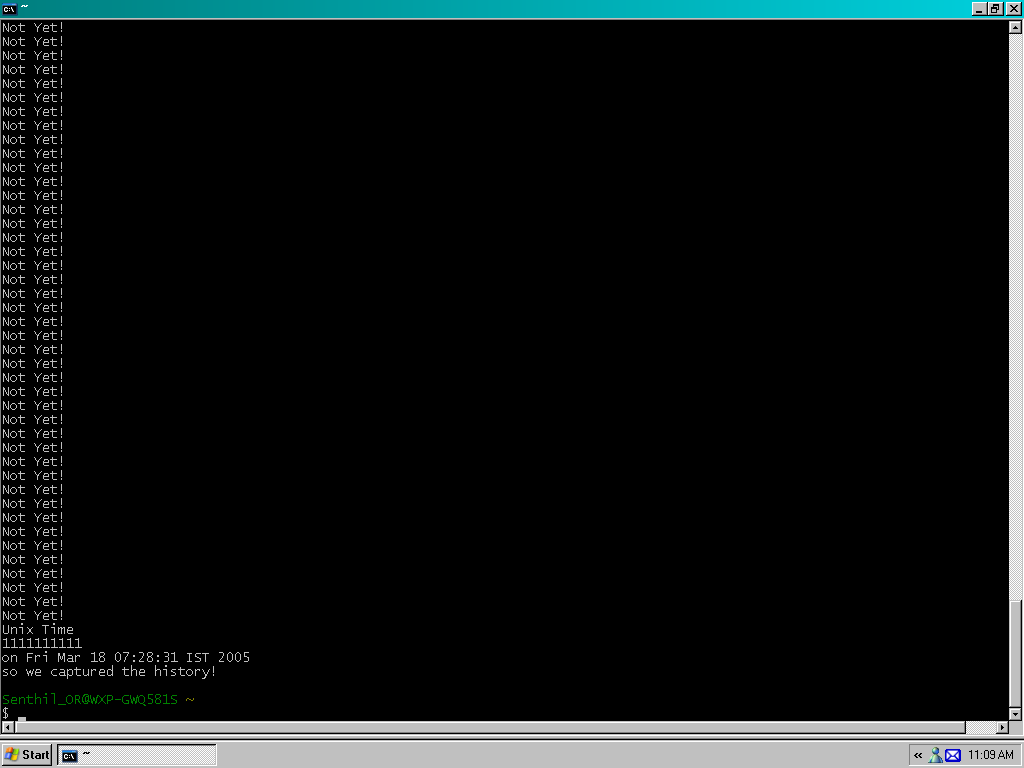
Well its like being there during 22/2/2222! Just for a rough comparision to Gagan whom I found very difficult to persuade as to whats so special in this.
Unix time 2222222222 will be on Sat, 02 Jun 2040 03:57:02 GMT
1111111111
#!/bin/bash
while [ $(date +%s) != 1111111111 ]
do
echo "Not Yet!"
done
echo "Unix Time"
date +%s
echo "on `date`"
echo "so we captured the history!"
exit 0
while [ $(date +%s) != 1111111111 ]
do
echo "Not Yet!"
done
echo "Unix Time"
date +%s
echo "on `date`"
echo "so we captured the history!"
exit 0
How to print * continuously in vim
/***********************************************/
These kind of lines might be required while commenting
/***********************************************/
The Command to use is simple appending the text.
[count]append[char]
- Press Esc to make sure you are in command mode.
- Press count. For eg: 10
- Press a. Mode changes to insert.
- Press the character to repeat. here it is *. one * will be inserted
- Press Esc. You will see the command take effect.
**********
Mozilla FireFox Extension - Linky
In one the the previous posts, I had mentioned about a need to select a portion of the page, right click and open the hyperlinks in tabs.
Found something called Linky.
Found something called Linky.
Sun Solaris 10

Tried Solaris today as Solaris 10 is now available for download and is applicable for x86 architecture.Dont really plan to move it, but wanted to check how it really looks.
Got a feel fo Java Desktop System ( thats Gnome!) and other things.
I will be getting more fam with Freak though.
Freak

Why would I want an LFS system?
There are a lot of reasons why somebody would want to install an LFS system. The question most people raise is 'why go through all the hassle of manually installing a Linux system from scratch when you can just download an existing distribution?'. That is a valid question which I hope to answer for you.
The most important reason for LFS's existence is teaching people how a Linux system works internally. Building an LFS system teaches you about all that makes Linux tick, how things work together, and depend on each other. And most importantly, how to customize it to your own taste and needs.
One of the key benefits of LFS is that you are in control over your system without having to rely on somebody else's Linux implementation. You are in the driver's seat now and are able to dictate every single thing such as the directory layout and boot script setup. You will also know exactly where, why and how programs are installed.
Another benefit of LFS is that you can create a very compact Linux system. When you install a regular distribution, you end up installing a lot of programs you probably would never use. They're just sitting there taking up (precious) disk space. It's not hard to get an LFS system installed under 100 MB. Does that still sound like a lot? A few of us have been working on creating a very small embedded LFS system. We installed a system that was just enough to run the Apache web server; total disk space usage was aproximately 8 MB. With further stripping, that can be brought down to 5 MB or less. Try that with a regular distribution.
If we were to compare a Linux distribution with a hamburger you buy at a supermarket or fast-food restaurant, you would end up eating it without knowing precisely what it is you are eating, whereas LFS gives you the ingredients to make a hamburger. This allows you to carefully inspect it, remove unwanted ingredients, and at the same time allow you to add ingredients to enhance the flavour of your hamburger. When you are satisfied with the ingredients, you go on to the next part of putting it together. You now have the chance to make it just the way you like it: broil it, bake it, deep-fry it, barbeque it, or eat it raw.
Another analogy that we can use is that of comparing LFS with a finished house. LFS will give you the skeleton of a house, but it's up to you to install plumbing, electrical outlets, kitchen, bathtub, wallpaper, etc.
Another advantage of a custom built Linux system is added security. You will compile the entire system from source, thus allowing you to audit everything, if you wish to do so, and apply all the security patches you want or need to apply. You don't have to wait for somebody else to provide a new binary package that fixes a security hole. Besides, you have no guarantee that the new package actually fixes the problem (adequately). You never truly know whether a security hole is fixed or not unless you do it yourself."
I had my Freak ready on Feb 22, 2005. Excited!
LFS User ID:14897
FireFox and Slashdot
I guess Firefox and Slashdot are very poor companions!
First is this bug which I often face, while trying to submit a story or while commenting!
This is not observed /encountered if using M$ ie.
And the next most irritating thing I am facing with FireFox + Slashdot is: My Login is not retained.
I login to slashdot and have customized light-weight outlook with reading only +5 comments. But I tend to lose the logged in account inconsistenly. Sometimes, just hitting the refresh button. sometimes while doing "Read More" in a new tab, times when trying to submit a story, times when commenting.
If this happened to you, would you not be irritated?
I thought it was some cookie related, but set things right ( to accept all cookies and retain cookies from parent site) but nothing worked!
Has anyone else faced the same problem? Am I alone in this world?
First is this bug which I often face, while trying to submit a story or while commenting!
I've mailed this to the Bill Cowboy as well.
Invalid form key: Q9jRDo9JhK


Chances are, you're behind a firewall or proxy,

or clicked the Back button to accidentally reuse a form.

Please try again. If the problem persists, and all other options

have been tried, contact the site administrator."
This is not observed /encountered if using M$ ie.
And the next most irritating thing I am facing with FireFox + Slashdot is: My Login is not retained.
I login to slashdot and have customized light-weight outlook with reading only +5 comments. But I tend to lose the logged in account inconsistenly. Sometimes, just hitting the refresh button. sometimes while doing "Read More" in a new tab, times when trying to submit a story, times when commenting.
If this happened to you, would you not be irritated?
I thought it was some cookie related, but set things right ( to accept all cookies and retain cookies from parent site) but nothing worked!
Has anyone else faced the same problem? Am I alone in this world?
Ode to a School Computer
Ode to a School Computer
By David Ahl
I was stay'in after school a week or so ago
'Cause I told a teacher where she could go
She had me settin' in this big old room
With a bunch of machines that just looked like doom
There's this big Mutha machine with flashing' lights
And a couple of funny-looking' electric typewrites
Well I thought I'd type somethin' for the fun of it
So I hunted and pecked out just one word - "shit"
Before I could lean back in my chair and get steady
That machine typed WHAT, and then it said READY
So I typed a whole line of them four-letter words
But it just replied WHAT and READY like it hadn't heard
Well I figured since I couldn't go out fishin'
I'd teach that stupid machine to listen
So I picked up this book called Teach yourself BASIC
And sat down at that Teletype prepared to face it
First I found to make that machine type my bit
I just had to put a PRINT in front of it
And then I found out that thing could add
And subtract and multiply and divide like mad
I found out too it knew all kinds of games
Like craps and blackjack and a cannon to aim
I was havin' all kinds of fun when that teacher walked in
She just looked at my output and started to grin
I kind of sheepishly asked if I could stay a while more
She said: "Sure; when you just shut the door".
I tried some more games like football and poker
And a parachute jump written by some kind of joker
There was one where I could try to land on the moon
It would crash and blow up if fired the engines too soon
Well, I played on through supper and into the night
And then finally quit when I saw dawn's first light.
Some girls, I know are while lot cuter
But I found a new kind of high with that computer.
By David Ahl
I was stay'in after school a week or so ago
'Cause I told a teacher where she could go
She had me settin' in this big old room
With a bunch of machines that just looked like doom
There's this big Mutha machine with flashing' lights
And a couple of funny-looking' electric typewrites
Well I thought I'd type somethin' for the fun of it
So I hunted and pecked out just one word - "shit"
Before I could lean back in my chair and get steady
That machine typed WHAT, and then it said READY
So I typed a whole line of them four-letter words
But it just replied WHAT and READY like it hadn't heard
Well I figured since I couldn't go out fishin'
I'd teach that stupid machine to listen
So I picked up this book called Teach yourself BASIC
And sat down at that Teletype prepared to face it
First I found to make that machine type my bit
I just had to put a PRINT in front of it
And then I found out that thing could add
And subtract and multiply and divide like mad
I found out too it knew all kinds of games
Like craps and blackjack and a cannon to aim
I was havin' all kinds of fun when that teacher walked in
She just looked at my output and started to grin
I kind of sheepishly asked if I could stay a while more
She said: "Sure; when you just shut the door".
I tried some more games like football and poker
And a parachute jump written by some kind of joker
There was one where I could try to land on the moon
It would crash and blow up if fired the engines too soon
Well, I played on through supper and into the night
And then finally quit when I saw dawn's first light.
Some girls, I know are while lot cuter
But I found a new kind of high with that computer.
Subscribe to:
Posts (Atom)